

Platform

Manage multiple service teams in one iService tenant

iService uses segments to give each team or brand its own topics, agents, access, forms, and business rules. Administrators manage tenant and team settings in one installation. Authorized teams share customer records while Segment Access Rights limit message and contact access.

A segmented organization of teams drawing on shared reusable configuration

Team rules for multiple service teams

Service administrators set distinct rules for teams and brands in one tenant.

iService gives each business unit its own handling in one tenant. Each team or brand keeps its own rules. Administrators manage every team in the shared tenant while segments apply each team’s rules.

A stepped terrace where one master piece on the top level feeds channels down into differently arranged working sets on the wider levels below

Tenant and team settings

Each team uses its own access, topics, forms, and business rules.

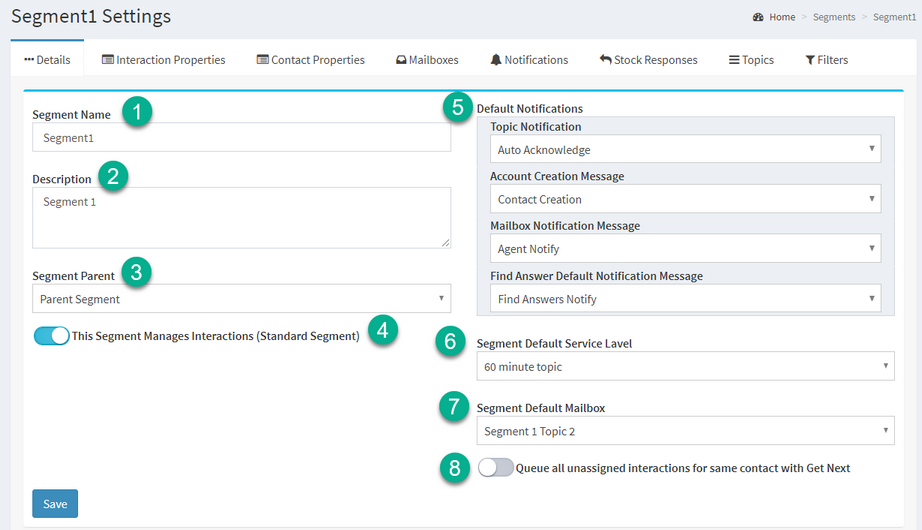
iService tenant settings and segments independently control access, topics, Custom Forms, and business rules for each team. Segments give each team its own topics, agents, and settings. Authorized teams use the shared customer record. Administrators configure team rules in iService.

An iService segment configured with the settings that separate one team from another

Configure a service team

An administrator creates a team segment and assigns its operating controls.

An administrator creates a segment for a team and grants its administrators access. The administrator configures the team’s topics, mailboxes, responses, properties, and filters. The team uses its own settings in the shared tenant. The administrator manages every team from the same tenant.

Shared records with Segment Access Rights

Teams access messages and customer data through their checked segments.

iService grants agents access to checked segments for messages and contact data. The tenant keeps one shared customer record while each team works in its authorized segments. Segment rules control team access to customer records.

Documented administration setup

Administrators need documented procedures for configuring several teams in one tenant.

iService Developer Docs and the User Guide document segment, access, topic, and tenant setup procedures for multi-team administration. The procedures state that iService grants agents access only to checked segments for messages and contact information, so each team works within its authorized segments.

Read iService admin docs

Read technical docs for iService setup procedures, segment setup, and team operating controls.

Read Technical Docs