

Platform

Search interaction and contact records

iService searches standard and custom interaction properties. Teams narrow results by type, status, topic, owner, and time, then export the complete result set to Excel. A semantic phrase ranks records within those metadata filters by relevance.

A search returning a grounded passage retrieved from the knowledge base

Search from known record details

Analysts assemble answers from mailboxes and spreadsheets when service records are not searched together.

iService searches the standard and custom interaction properties accessible to your team. Analysts start with the detail behind a question and find the exact service record. The search creates one result set from the service records your team can access.

Search criteria
  1. Known detailA standard or custom interaction property
  2. Operating scopeType, status, topic, owner, and time
  3. Complete result setExport the selected records to Excel

Filter records before semantic ranking

A broad search returns records outside the operational question.

iService narrows results by type, status, topic, owner, and time. Metadata criteria retrieve the result set first. A semantic phrase then ranks that set by relevance. The criteria determine which interactions semantic ranking can consider.

Interaction search control with semantic relevance enabled and a field for describing the information needed

Export a complete result set

An analyst needs a complete group of related records before making an operational decision.

An analyst starts with a known interaction property, then narrows the search by type, status, topic, owner, and time. The criteria retrieve a complete result set. The analyst enters a semantic phrase to rank matching records, then exports the whole set to Excel. The exported records support the next operational decision.

Search custom properties with metadata criteria

Service teams need search properties and criteria that match the records in their tenant.

iService searches the custom properties your tenant defines. It applies semantic relevance after metadata filters retrieve a result set. Your properties and criteria determine the search boundary before relevance changes record order.

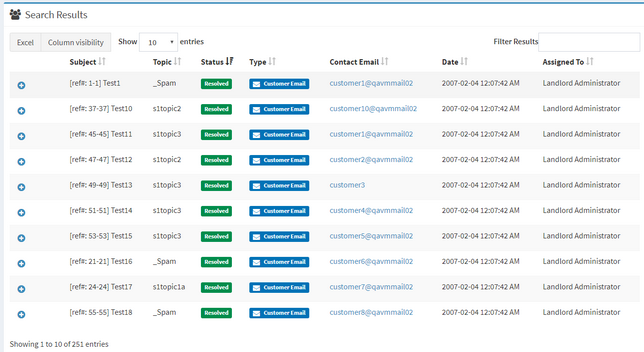
iService interaction search results in a configurable grid of the selected properties

Keep metadata criteria in the search

Teams need semantic ranking to apply only to records that match their search criteria.

iService uses a semantic phrase after metadata filters retrieve the result set. Relevance ranks interactions inside that boundary. The criteria still determine the type, status, topic, owner, time, and custom-property records that search returns.

Search your service records in iService

See iService search the properties your tenant defines, narrow the results, and rank selected records by the meaning in your question.

Request a Demo