Platform

Customer interaction history

iService keeps every customer message, form, note, and approval in one durable interaction thread. When an agent takes over, iService shows the contact, earlier replies, and previous notes before the next answer. Your team sees the conversation history and continues the work without asking the customer to repeat it.

What lands on one record
  1. Email, chat, and formsEvery inbound message on the same thread
  2. Notes and approvalsWhat agents told each other, kept
  3. Contact and accountProperties, subscriptions, and linked contacts

Conversation context during handoffs

The next agent needs the details from the conversation already in progress.

iService carries captured context through the interaction history. Agents read the messages, notes, forms, and approvals already recorded, then answer from the same conversation. Customers do not need to repeat the details another agent collected.

Shared customer conversations

Agents and supervisors regularly take over conversations started by someone else.

iService displays the contact and interaction history beside the current work. An agent or supervisor can see the earlier conversation when they take over, across shifts, specialists, and follow-up messages.

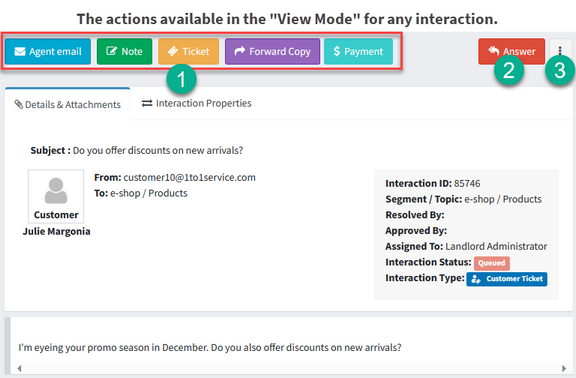
An iService interaction open in view mode, showing the message, its properties, and the actions available on it

Customer context beside each message

Agents need account details and previous replies while they write the current response.

iService opens Interaction and Contact Search beside the message an agent is answering. The view shows contact properties, subscriptions, prior interactions, the conversation record, and account context. Agents check earlier exchanges and captured customer details before sending the next reply.

Explore Interaction Search

One long horizontal thread of past exchanges with three people standing at separate points along it and one older exchange lit and lifted clear

A customer handoff in iService

A customer follows up about a credit while billing approval remains open.

The first agent records the credit promise in the iService interaction thread. A second agent takes over, reads the earlier replies and notes, and sends the credit to billing for approval. When the customer writes again, another agent opens the message in iService. The contact history, promise, billing approval, and earlier agent notes appear beside it. The agent confirms the credit, records the reply, and leaves the complete sequence for the next handoff.

The same record, three times
  1. First agentPromises the credit and notes it
  2. Second agentSends it to billing and notes it
  3. Third agentOpens the record and answers

History organized by conversation

A customer can return with a new message about an earlier issue.

iService organizes interaction history around the contact and conversation, not a ticket that disappears when it closes. When the customer writes again, the agent opens the earlier thread and its captured context before handling the new message.

Interaction history and customer records

Salesforce or a billing platform can own the account record while your support team handles the conversation.

iService links its interaction record to Salesforce or your billing platform when that system owns the account. iService does not replace the customer master. It keeps the messages, forms, notes, and approvals your team needs to continue the service conversation.

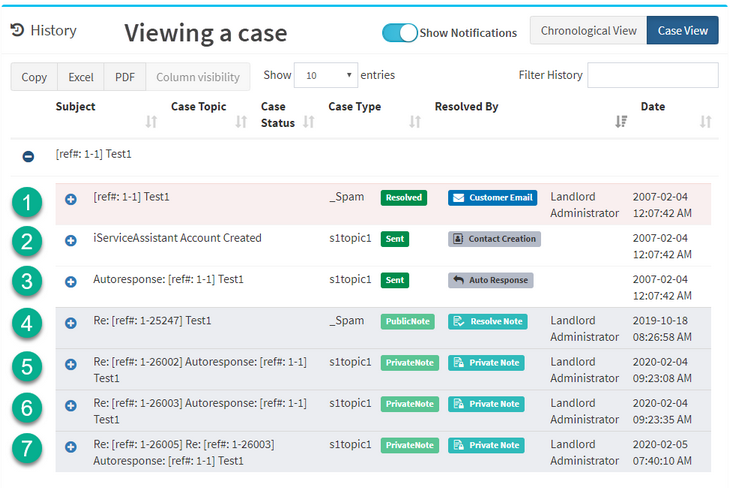
The iService contact history for one customer, listing every related interaction in a single case

See customer interaction history in iService

Request a demo to see the contact, earlier replies, agent notes, forms, and approvals your next agent sees before answering a customer.

Request a Demo