

Platform

Workflow automation with Answer Panels

iService workflows capture the details each service request needs. Workflow owners configure panels, decisions, and actions from intake through resolution. Agents see an Answer Panel with the approved content and exact actions for the request they are answering. The panel updates interaction properties and starts the next workflow action as they reply.

Request a workflow demo

A workflow advancing an interaction with a contextual answer panel alongside

Put the exact guidance and buttons in each workflow

Private snippet files drift when they sit outside the workflow agents follow.

iService puts approved guidance inside the workflow. Each step shows the buttons, content, and decisions for that moment in the request. Your team removes private snippet files that drift from the workflow instead of maintaining guidance in a separate place. One workflow definition keeps customer forms and agent assistance on the same request path.

Three controls select the experience
  1. TopicMatch a known request category
  2. TagMatch system-managed context
  3. Topic + tagRequire both conditions

Answer Panel interaction controls

Agents need the right controls when they answer each request.

iService Answer Panels set interaction properties and trigger the next workflow action as an agent replies. Workflow owners configure the panel decisions and actions for each request path. Agents see the approved content and exact actions that apply to the request, then use the panel while they respond. The workflow records the needed details and moves the request to its next step.

An interaction advancing through configured workflow states beside a guiding answer panel

A tagged request in progress

A tagged request needs its own approved content and workflow actions.

An agent opens a request with a topic and tag. iService selects the custom Answer Panel configured for that combination. The panel shows the approved content, decisions, and actions for the next response. With one click, the agent runs the configured sequence: iService creates a ticket, sends an acknowledgement, and updates the interaction properties. The request then moves to its next workflow action.

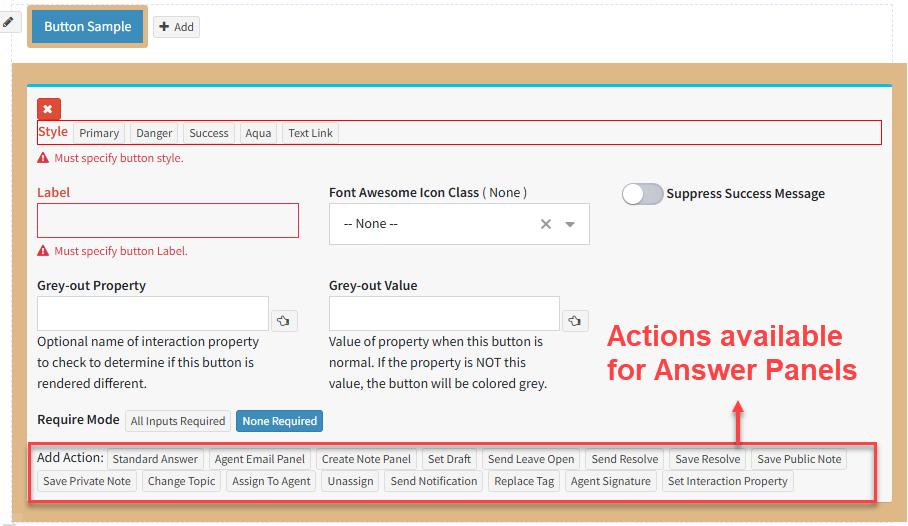
Answer Panel button settings with actions for drafting, sending, resolving, noting, assigning, notifying, signing, tagging, and setting an interaction property

Answer Panels for each request type

Different requests need different decisions, content, and actions.

iService selects a custom Answer Panel by topic, tag, or both instead of sending every request through standard controls. Each panel shows the decisions and actions configured for that type of request. Agents work from controls that match the request in front of them, while the workflow applies the same path to its automated steps.

One workflow for automation and agents

Workflow owners need automation and agent assistance to follow the same process.

iService uses one workflow definition for automated steps and agent assistance. A Submit Panel or Answer Panel button can run multiple configured actions, including creating tickets, sending acknowledgements, and updating interaction properties. The shared definition keeps those actions and approved guidance on the same request path.

See your workflow in iService

See a routine request move through the workflow definition your team uses, with approved guidance, panel decisions, and configured actions.

Request a workflow demo