Platform

Route customer work to the right team

iService uses configured topics, skills, and assignment rules to send incoming work to the responsible agent or team. You shape queues by segment, topic, and workflow state, while supervisors and operations managers keep direct control of unresolved requests.

Queue ownership and response times

Supervisors spend time reassigning work to keep queues balanced each morning.

When work waits in the wrong queue, supervisors start the day moving requests between teams to protect response times. iService applies routing rules as work arrives and changes, reducing the manual reassignment your supervisors do to keep queues balanced.

Arriving work directed by an overhead sorting junction into the holding column it belongs in, with each team working its own full column

Routing rules and escalation timers

Customer work needs a current owner as it moves through your workflow.

Workflow Automation applies assignment rules, ownership, and escalation timers as workflow state changes. Segment Management uses topics and skills to send each request to the responsible agent or team. These rules move work onward as its state changes, so your supervisors do not need to redistribute routine requests by hand. Your queue structure keeps work organized by the segment, topic, and workflow state that matter to your operation.

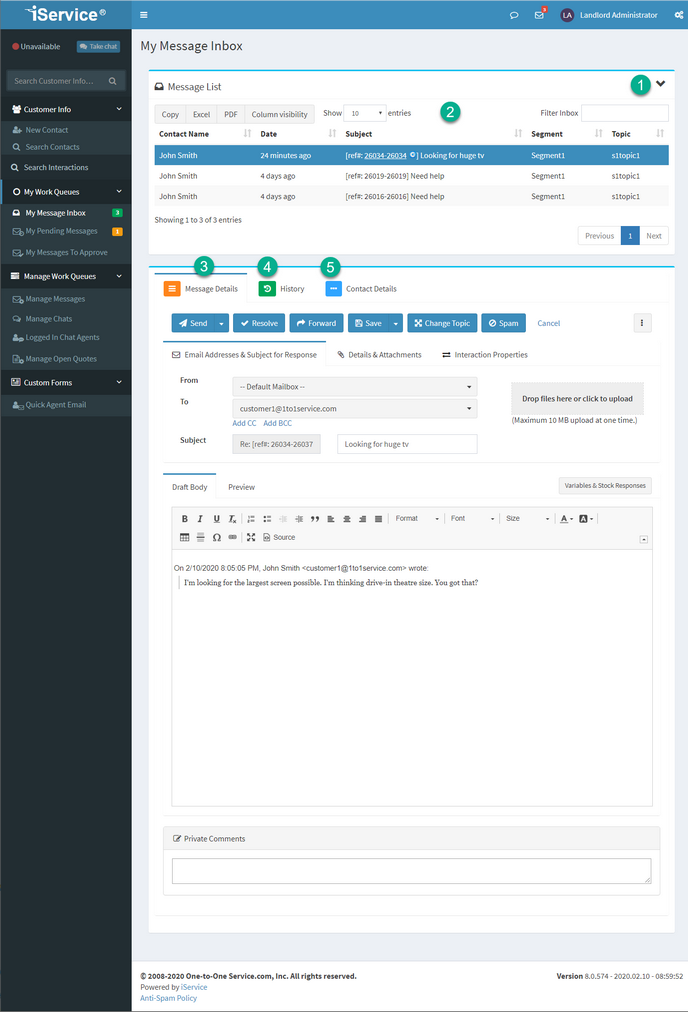
The iService My Message Inbox listing the queued interactions assigned to one agent

Get Next queue assignment

Agents need the next Message Queue request that matches both their Skills and its Service Levels priority.

An agent selects Get Next in My Message Inbox. iService checks Message Queue for the next eligible request by Service Levels priority and matching Skills. It assigns that request to the agent and opens it in My Message Inbox. The agent starts work from the request selected for their skills and queue priority.

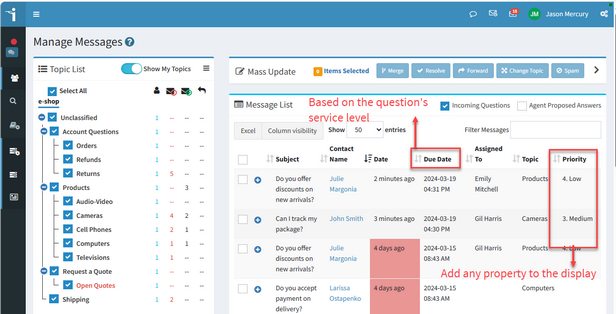
iService Manage Messages showing queued interactions grouped under the topic tree

Queue structure

A flat shared inbox mixes every request together, regardless of the team, topic, or workflow state that should own it.

iService shapes queues by segment, topic, and workflow state, rather than putting every request in one flat shared inbox.

Supervisor routing control

Supervisors need to manage queue health without surrendering assignment decisions to routing rules.

iService keeps direct assignment control with supervisors and operations managers. They assign unresolved requests themselves while configured topics, skills, and assignment rules route routine work. Your managers control exceptions without manually reassigning every request each morning.

Routing and Workflow Automation

See how Workflow Automation moves requests onward as their workflow state changes.

See Workflow Automation