

Common use case

Give agents customer context and actions in the interaction

iService puts the active interaction, approved wording, search results, and next workflow actions on one screen. Skills-based routing assigns the next question to the qualified agent. Answer Panels, AI-Assisted Search, and Generative Assistance support the response. Agents review and edit generated drafts before sending them.

An agent workspace pairing customer context with a guided answer panel and routed work

Agent guidance in the active interaction

Agents use the customer record, approved guidance, search results, and workflow actions during an active interaction.

iService keeps the interaction, approved response, and next workflow step beside active customer work. Answer Panels, search, and assisted drafting remain in the interaction. Agents find guidance, draft a response, and complete the next action from the same customer record.

An agent at one wide curved surface whose four live regions all face them, with nothing else standing within reach

Guidance, search, and drafting in one screen

The active customer interaction contains the record, approved guidance, search results, and workflow actions.

iService combines Answer Panels, AI-Assisted Search, and Generative Assistance beside the active interaction. Agents find guidance, draft a response, and complete the next workflow action in the same view. Generated text enters the agent draft for review and editing. The agent sends the final response.

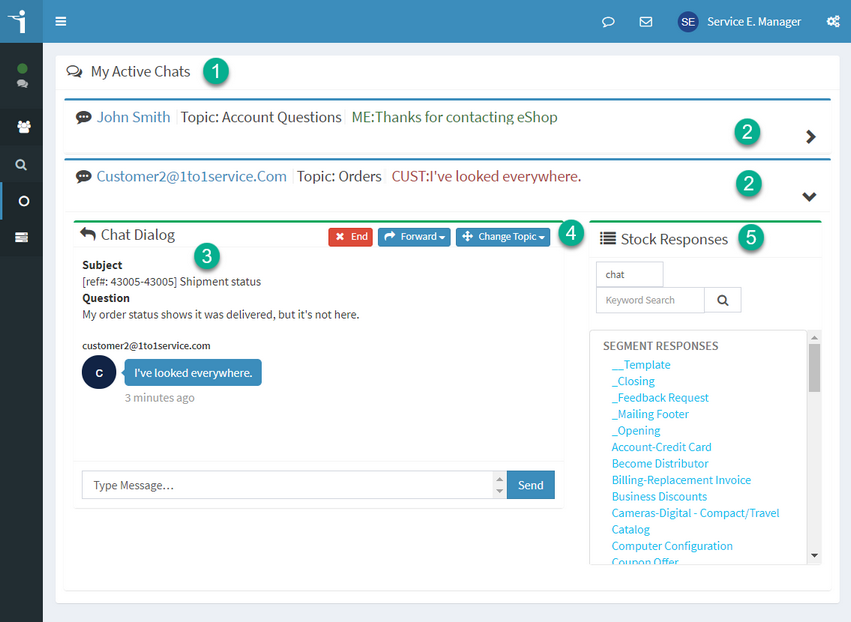
An iService agent handling several active chats from one screen

A question from assignment to action

A skills-matched question moves from My Message Inbox through ordered Answer Panel actions.

iService assigns the next skills-matched question and loads it in My Message Inbox. The agent opens the interaction, uses Answer Panel guidance and search results, and reviews the drafted response. Ordered Answer Panel actions save the draft and update the interaction. The agent completes the next action in the active customer question.

Response and workflow step beside the record

The active interaction contains the record, approved response, generated draft, and next workflow step.

iService keeps the record, approved response, and next workflow step beside the active interaction. Generative Assistance places draft text in the response for review and editing. The agent uses the context and action in one screen before sending the response.

Agent review of generated responses

Contact center agents review and edit generated response drafts before sending customer answers.

iService gives agents in-context guidance, search, and drafting during customer work. Answer Panels, AI-Assisted Search, and Generative Assistance support the next action beside the interaction. The agent reviews and edits generated text before sending the customer response.

Request an iService demo

iService combines the active interaction, Answer Panels, search, assisted drafting, and workflow actions in one view.

Request a Demo