

Product resource

Map Answer Panels to service workflows

The iService Workflow Answer Panels Brief maps a defined process and approved response to iService workflows and Answer Panels. It connects service-request intake, workflow state, agent actions, and automated steps in one workflow.

A process-specific answer panel of fields, decisions, and actions beside a workflow track

Workflow design for service requests

Service-request intake, workflow actions, and agent guidance use the same request process.

The iService brief starts with a defined process and approved response. It maps those choices to a workflow and the actions agents use during the request. Service teams follow the workflow from structured intake to follow-up.

One blank definition plate from which two identical impressions are lifted, one driving a mechanism and one becoming an agent guidance surface

Shared workflow

Automated steps and agent-facing actions use the same workflow.

iService Answer Panels use interaction properties and actions from the Workflow Automation workflow that controls each step. The panel shows fields, details, choices, and actions for the request. The workflow carries process state, approvals, notifications, and follow-up. Agents use panel actions in the same workflow.

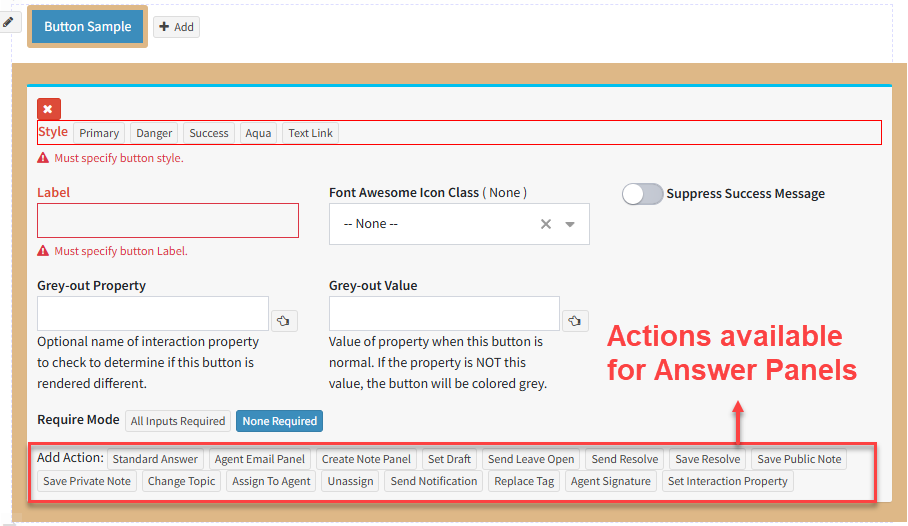
The actions configured on an iService answer panel

Structured intake to follow-up

A service request moves from structured intake through decisions, approvals, notifications, and follow-up in one workflow.

A service request begins with structured intake. iService Answer Panels show fields, choices, and actions for the request. The workflow carries state, approvals, notifications, and follow-up. The same workflow connects the agent-facing panel to each automated step.

One workflow for agents and automated steps

iService uses one workflow for agent actions and automated steps.

The same workflow controls automated steps and agent-facing answers. Agents and automated steps follow the workflow as work moves. Teams maintain the request process in the shared workflow.

Workflow setup details

The Workflow Automation page and Developer Docs list workflow setup steps and procedures.

The iService brief shows a representative workflow. The Workflow Automation page and Developer Docs list product details and workflow setup steps. Service teams use those sources for setup details.

Explore iService Workflow Automation

Explore Workflow Automation for the iService workflow, Answer Panel, automated steps, and agent-facing actions.

Explore Workflow Automation