
Platform

Send consent-based service texts from iService

iService captures SMS consent through an explicit form toggle tied to a named phone property. After the customer opts in, iService creates the messaging login. Agents send personalized SMS messages while starting or continuing the customer conversation. Incoming replies appear in the same workspace and return to the agent who started the conversation.

SMS consent for service texts

Service teams need recorded SMS consent before they send a time-sensitive customer notice.

iService collects SMS consent through an explicit form toggle tied to the customer phone number. After consent is recorded, iService creates the messaging path for service texts. A time-sensitive notice reaches the phone the customer checks.

A close overhead of a form corner where a marked agreement token sits beside digits settling into a shallow holding well, one thin line running out of frame

SMS consent and the customer property

Service teams need an SMS channel tied to the customer consent record and named phone property.

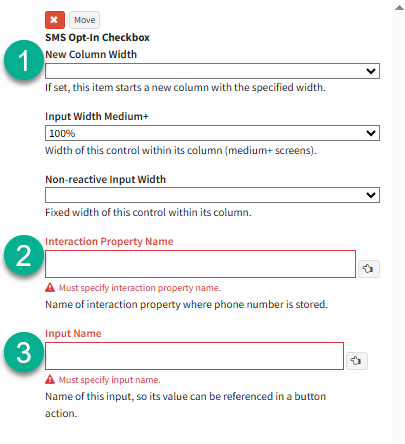
iService adds an SMS opt-in toggle to your form and displays the consent label before the customer agrees. When the customer enters a phone number in its named property and selects SMS consent, iService creates the E2S login used to send texts and handle replies. The login connects your E2S partner number to the iService service mailbox.

The iService SMS opt-in element configured on a workflow panel

A text from the customer interaction

Agents need a consented SMS channel inside the customer interaction.

A customer submits a form, enters a phone number in its named property, and selects the SMS opt-in toggle. After recorded consent, iService creates the E2S login. An agent opens or continues the customer conversation, uses an SMS template with customer data, and sends the text. The interaction keeps the outgoing text, and the reply returns to the same workspace.

Replies in the agent workspace

Incoming SMS replies appear in the same workspace and return to the agent who started the conversation.

iService routes each incoming SMS reply to the agent who started the conversation. Agents can include mobile addresses for multiple people in the same interaction. The text exchange remains in the active customer conversation.

A consent-based partner channel

A phone number must not create an SMS channel before the customer gives recorded consent.

iService connects your E2S partner number with its service mailbox. It creates the customer login only after recorded SMS consent from the form and named phone property. The messaging channel stays tied to the consent record in the customer interaction.

See SMS service messaging in iService

Request a demo to see iService collect consent, create the messaging login, send a personalized SMS, and route the reply to the starting agent.

Request a Demo